
Compress tool outputs, logs, files, and RAG chunks before they reach the LLM. 20% fewer tokens for coding agents, 60-95% fewer tokens for JSON, same answers. Library, proxy, MCP server.
DockerPython 依赖Rust示例代码+3
66k9.0kPythonApache-2.0今天
开箱即用

google-gemini/gemini-cli
An open-source AI agent that brings the power of Gemini directly into your terminal.
按顺序执行即可在本地跑起来;具体参数以项目 README 为准。
克隆仓库到本地
git clone --depth 1 https://github.com/google-gemini/gemini-cli.git
cd gemini-cli用 Docker 一键起环境,无需本机装依赖。仓库里没有 compose 文件时,改用 docker build -t app . 再 docker run --rm -it app
docker compose up -d安装 Node 依赖并启动开发服务
npm install && npm run dev直接用 Make 构建
make




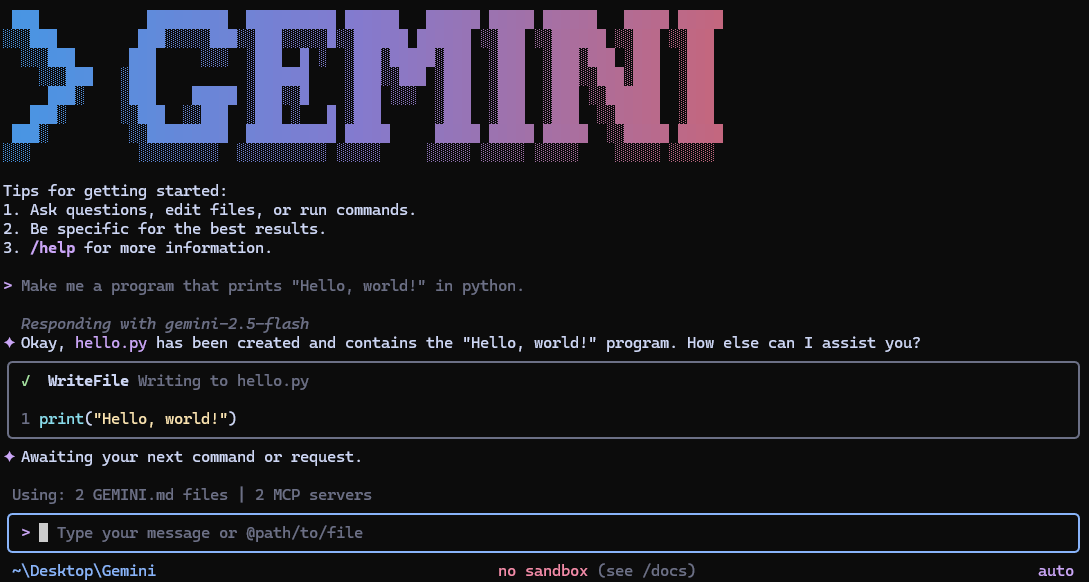
Gemini CLI is an open-source AI agent that brings the power of Gemini directly into your terminal. It provides lightweight access to Gemini, giving you the most direct path from your prompt to our model.
Learn all about Gemini CLI in our documentation.
See Gemini CLI installation, execution, and releases for recommended system specifications and a detailed installation guide.
# Using npx (no installation required)
npx @google/gemini-cli
npm install -g @google/gemini-cli
brew install gemini-cli
sudo port install gemini-cli
# Create and activate a new environment
conda create -y -n gemini_env -c conda-forge nodejs
conda activate gemini_env

# Install Gemini CLI globally via npm (inside the environment)
npm install -g @google/gemini-cli
See Releases for more details.
New preview releases will be published each week at UTC 23:59 on Tuesdays. These
releases will not have been fully vetted and may contain regressions or other
outstanding issues. Please help us test and install with preview tag.
npm install -g @google/gemini-cli@preview
preview release + any bug fixes
and validations. Use latest tag.npm install -g @google/gemini-cli@latest
nightly tag.npm install -g @google/gemini-cli@nightly
Integrate Gemini CLI directly into your GitHub workflows with Gemini CLI GitHub Action:
@gemini-cli in issues and pull requests
for help with debugging, explanations, or task delegationChoose the authentication method that best fits your needs:
✨ Best for: Individual developers as well as anyone who has a Gemini Code Assist License. (see quota limits and terms of service for details)
Benefits:
gemini
# Set your Google Cloud Project
export GOOGLE_CLOUD_PROJECT="YOUR_PROJECT_ID"
gemini
✨ Best for: Developers who need specific model control or paid tier access
Benefits:
# Get your key from https://aistudio.google.com/apikey
export GEMINI_API_KEY="YOUR_API_KEY"
gemini
✨ Best for: Enterprise teams and production workloads
Benefits:
# Get your key from Google Cloud Console
export GOOGLE_API_KEY="YOUR_API_KEY"
export GOOGLE_GENAI_USE_VERTEXAI=true
gemini
For Google Workspace accounts and other authentication methods, see the authentication guide.
gemini
gemini --include-directories ../lib,../docs
gemini -m gemini-2.5-flash
Get a simple text response:
gemini -p "Explain the architecture of this codebase"
For more advanced scripting, including how to parse JSON and handle errors, use
the --output-format json flag to get structured output:
gemini -p "Explain the architecture of this codebase" --output-format json
For real-time event streaming (useful for monitoring long-running operations),
use --output-format stream-json to get newline-delimited JSON events:
gemini -p "Run tests and deploy" --output-format stream-json
cd new-project/
gemini
> Write me a Discord bot that answers questions using a FAQ.md file I will provide
git clone https://github.com/google-gemini/gemini-cli
cd gemini-cli
gemini
> Give me a summary of all of the changes that went in yesterday
/help, /chat, etc)./bug command to report issues directly from the CLI.Configure MCP servers in ~/.gemini/settings.json to extend Gemini CLI with
custom tools:
> @github List my open pull requests
> @slack Send a summary of today's commits to #dev channel
> @database Run a query to find inactive users
See the MCP Server Integration guide for setup instructions.
We welcome contributions! Gemini CLI is fully open source (Apache 2.0), and we encourage the community to:
See our Contributing Guide for development setup, coding standards, and how to submit pull requests.
Check our Official Roadmap for planned features and priorities.
See the Uninstall Guide for removal instructions.
Compress tool outputs, logs, files, and RAG chunks before they reach the LLM. 20% fewer tokens for coding agents, 60-95% fewer tokens for JSON, same answers. Library, proxy, MCP server.
Milvus is a high-performance, cloud-native vector database built for scalable vector ANN search
Open-source 24/7 Cowork app for OpenClaw, Hermes, Claude Code, Codex, OpenCode and 20+ more CLI Agent | Customize your assistants | Team them up|Star if you like it!

